ReputeMap integrations
ReputeMap connects natively to Google Business Profile and sends alerts by email, Telegram and WhatsApp. Your CRM, field-service, booking or point-of-sale software connects through one REST API call: when a deal is won or a job is done, the tool's own automation asks ReputeMap to email that customer an honest Google review request.
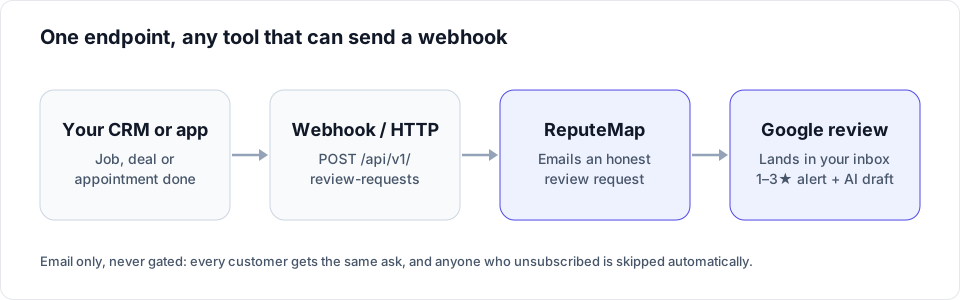
No native marketplace apps yet, and we say so on every guide. What each guide gives you instead is the exact automation to build in that tool: the trigger, the HTTP request with your API key, the fields to map, and what happens after the ask. Setup takes about 15 to 20 minutes.
CRMs
When a deal is won or a job is closed, your CRM's own automation calls ReputeMap once and the customer gets a review request for the right Google location.
| Tool | Type | How it connects | Guide |
|---|---|---|---|
| HubSpot | CRM | Workflow webhook → ReputeMap API | HubSpot guide |
| Salesforce | CRM | Flow HTTP callout → ReputeMap API | Salesforce guide |
| Microsoft Dynamics 365 | CRM | Power Automate HTTP action → ReputeMap API | Dynamics 365 guide |
| Zoho CRM | CRM | Workflow rule webhook → ReputeMap API | Zoho CRM guide |
| Pipedrive | CRM | Automation webhook → ReputeMap API | Pipedrive guide |
| GoHighLevel | CRM for agencies | Workflow webhook → ReputeMap API | GoHighLevel guide |
Field service, booking and POS
The tool's Zapier trigger (job closed, job finished, appointment booked) feeds one Webhooks by Zapier step that posts to ReputeMap. Webhooks by Zapier needs a paid Zapier plan (Professional or higher).
| Tool | Type | How it connects | Guide |
|---|---|---|---|
| Jobber | Field service | Zapier trigger + webhook → ReputeMap API | Jobber guide |
| Housecall Pro | Field service | Zapier trigger + webhook → ReputeMap API | Housecall Pro guide |
| ServiceTitan | Field service | Zapier trigger + webhook → ReputeMap API | ServiceTitan guide |
| Square Appointments | Booking and POS | Zapier trigger + webhook → ReputeMap API | Square guide |
| Any app with a Zapier trigger | Automation | Webhooks by Zapier → ReputeMap API | Zapier recipe |
Native connections
Built into ReputeMap itself: nothing to configure beyond signing in.
| Tool | Type | How it connects | Guide |
|---|---|---|---|
| Google Business Profile | Reviews and replies | Native: sign in with the Google account that owns or manages the profile | Connect Google |
| Alerts | Native: 1–3★ alerts with the reply drafted and a no-login publish link | Negative-review alerts | |
| Telegram | Alerts | Native bot: alerts with one-tap publish in a private chat | Telegram alerts |
| Alerts | Native: the alert only (replies are published from email, Telegram or the inbox) | WhatsApp alerts |
For developers and AI assistants
The same endpoints behind every integration above, plus a hosted MCP server.
| Tool | Type | How it connects | Guide |
|---|---|---|---|
| REST API | Developers | API key; reviews, stats, locations, review requests | API reference |
| MCP server | AI assistants | Hosted MCP endpoint for Claude and other MCP clients | MCP server |
What every integration gets you
- The right Google profile, per location. Each request names a ReputeMap location, so a multi-location business never sends a customer to the wrong listing.
- Honest asks only. Every customer gets the same email, unsubscribes are honored, and a customer already asked for that location is not emailed twice.
- Replies without logging in. New 1–3★ reviews arrive as an alert with the reply already drafted in the reviewer's language and a "Review & publish reply →" link.
- Locations included in the plan price, from Solo at $19/month for one location to Network at $189/month for 200, with a 14-day free trial (card required, cancel anytime).
FAQ
Does ReputeMap integrate with my CRM?
Yes, if your CRM can send a webhook or an HTTP request from its automation (HubSpot, Salesforce, Microsoft Dynamics 365, Zoho CRM, Pipedrive and GoHighLevel all can, on the plans each guide names). The automation calls ReputeMap's POST /api/v1/review-requests endpoint when a deal or job is done, and ReputeMap emails that customer a review request for the right Google location.
Are these native marketplace apps?
No. ReputeMap does not have an app in the HubSpot, Salesforce, Zoho, Pipedrive, Microsoft or HighLevel marketplaces, or a public Zapier app, yet. Each guide uses the CRM's own automation (or Zapier's Webhooks step) to call ReputeMap's public REST API, which takes about 15 to 20 minutes to set up.
Which ReputeMap plan includes the API?
Every paid plan, from Solo up, and the 14-day free trial. Each organization gets 1,000 API credits a month (one per billable call), shared with the MCP server; asking the same customer twice for the same location is not sent again and costs no credit.
Can Google reviews flow back into my CRM?
Not automatically: ReputeMap does not push reviews to other tools. A developer can pull reviews and per-location stats with GET /api/v1/reviews and GET /api/v1/stats on a schedule. Alerts for new reviews go to email, Telegram or WhatsApp, and replies are published from the ReputeMap inbox, the alert email or a Telegram private chat.
Can ReputeMap send review requests by SMS?
No. Review requests go by email (plus QR codes and links you share yourself). If your customers only respond to text messages, ReputeMap is not the right fit for the asking part.
Connect your tools in about 15 minutes
Start the 14-day free trial, create an API key in Settings, and paste it into your CRM's automation. The API is included in every plan.
Get started