Google Review Requests From GoHighLevel, Sent Through ReputeMap
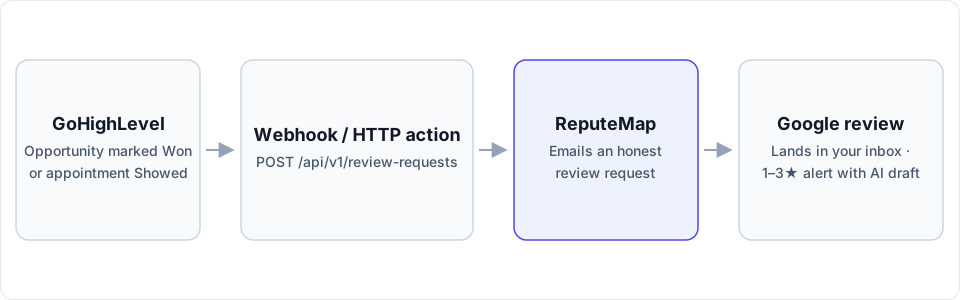
Keep GoHighLevel as the CRM your agency runs on. One Custom Webhook step in a workflow hands each finished customer to ReputeMap, which emails the Google review request and watches for what comes back.
 By Yaro (Yaroslav Mykhailov), founder of ReputeMap · Updated
Reading this for your own business? See where it stands on Google right now. It's free, with no signup.
Live from Google · free · nothing is stored
Does ReputeMap integrate with GoHighLevel?
Yes — you can send Google review requests from GoHighLevel automatically: a workflow fires when an opportunity is marked Won or an appointment is marked Showed, its Custom Webhook action posts the contact’s email and first name to ReputeMap’s API, and ReputeMap emails that customer an honest request to review the right Google location. ReputeMap has no native app in HighLevel’s app marketplace; it’s an API call from GoHighLevel’s own workflow builder, and setup takes about 15–20 minutes.
This page is for agencies and businesses that want to keep GoHighLevel as their CRM and hand only the Google-review job to ReputeMap. Leaving GoHighLevel’s reputation tool altogether is a different decision, covered in our GoHighLevel alternative comparison.
Do you need ReputeMap if GoHighLevel can already ask for reviews?
Maybe not, and it’s worth settling before you build anything. GoHighLevel has its own reputation tool. If your clients’ customers answer texts better than email, you’re happy building and maintaining review workflows inside GoHighLevel, and no client asks for a monthly review report, the built-in tool may cover you. A second subscription would then be cost without benefit.
ReputeMap earns its place when the Google-review loop needs to run without anyone maintaining it: the ask, the reply drafts, the low-star alerts and the client report. Here is the split, using only what our GoHighLevel alternative page already documents for GoHighLevel:
| What you need | GoHighLevel’s built-in reputation tool | GoHighLevel + ReputeMap |
|---|---|---|
| Review-request channel | SMS or email, via workflows you build | Email only, no SMS (plus QR codes for in-person asks) |
| The ask itself | A workflow and message you write and maintain | ReputeMap’s honest email under the client’s business name, with one-click opt-out |
| AI review replies | Via workflow configuration | One-click drafts in the reviewer’s language; a 1–3★ alert carries the draft |
| Negative-review alerts | Configurable | Email, Telegram or WhatsApp, out of the box |
| Client-facing white-label | Full SaaS mode (you run billing) | Branded PDF reports and client portal on Pro and above |
| Review gating | Possible to configure | Impossible by design |
Keep GoHighLevel for the pipeline, calendars and messaging; add ReputeMap only for the Google-review job.
How does one workflow cover every sub-account?
In GoHighLevel, each client is a sub-account with its own workflows and custom values. In ReputeMap, your agency has one workspace holding every client and their Google locations, and one API key covers all of them. The only thing that changes from client to client is the location ID.
| In GoHighLevel | In ReputeMap | How they connect |
|---|---|---|
| Agency account | Your ReputeMap workspace | One API key (rmk_…), created by an owner or admin |
| Sub-account (one client) | That client and its Google location | The location ID, saved as a custom value in the sub-account |
| Contact | The customer who receives the email | {{contact.email}} and {{contact.first_name}} |
| Workflow with a Custom Webhook step | POST /api/v1/review-requests | The same body in every sub-account |
Pull every ID at once with GET https://api.reputemap.com/api/v1/locations: each location comes back with its id and a label such as “Joe’s Plumbing — Downtown”. In each sub-account, open Settings → Custom Values, create one named “ReputeMap location ID” and paste that client’s ID. If you deploy the workflow to clients by snapshot, fill in the value in each sub-account after it lands.
Two numbers matter at agency scale. All sub-accounts share your workspace’s 1,000 API credits a month (one per request, shared with the MCP server, reset on the 1st), and requests are limited to 60 a minute. When the month’s credits are spent, ReputeMap answers HTTP 429 until the 1st; if your clients together close more than that, higher allowances are a conversation with the founder.
How do you set up the Custom Webhook in a GoHighLevel workflow?
- Create a ReputeMap API key. In ReputeMap, go to Settings → API keys (owners and admins only). The key starts with
rmk_and is shown once, so store it like a password. - Create the workflow. In the sub-account, open Automation → Workflows → Create Workflow → Start from scratch.
- Pick the trigger. Use Opportunity Status Changed with the Moved To Status filter set to Won (add In Pipeline if only one pipeline should ask). For appointment businesses, use Appointment Status with the status Showed.
- Add the action. Click +, then Send Data → Custom Webhook. Set Event to CUSTOM, Method to POST and URL to the endpoint below.
- Authenticate. Under Authorization, choose Bearer Token and paste the key. (A header
X-API-Key: rmk_…works too.) - Write the body. Set Content-Type to
application/jsonand paste the raw body below, inserting the values from the merge-field picker. - Test, then publish. Run Test Workflow on a contact that has your own email address. A
{"status": "sent"}response means the ask is on its way; turning on Save response from this Webhook, where your account offers it, keeps that answer for troubleshooting.
The exact request:
POST https://api.reputemap.com/api/v1/review-requests
Authorization: Bearer rmk_YOUR_KEY
Content-Type: application/json

{
  "location_id": "{{custom_values.reputemap_location_id}}",
  "email": "{{contact.email}}",
  "name": "{{contact.first_name}}"
}
GoHighLevel builds the custom value’s key from the name you gave it, so pick it from the picker rather than typing it. With a single client you can paste the location ID straight into the body instead.
| ReputeMap field | Required | GoHighLevel value | What happens with it |
|---|---|---|---|
location_id | Yes | {{custom_values.reputemap_location_id}}, or the pasted ID | Routes the ask to the right Google listing |
email | Yes | {{contact.email}} | A blank or malformed address returns HTTP 422 and nothing is sent |
name | No | {{contact.first_name}} | The email greets the customer by name (“Hi Sam,”), or with “Hi,” when it’s empty |
One cost sits on the GoHighLevel side. HighLevel’s help center lists custom webhooks among its Workflow Premium Features: without a paid Workflow Pro plan, premium executions are billed at $0.01 each (as of October 2026, per the article last updated September 28, 2026). The agency switches premium features on under Settings → Company → Workflow - Premium Features and can rebill each sub-account.
The full endpoint reference, including every response and error code, is in the ReputeMap API docs.
When should the request fire?
Pick the event that means the work is done, not the event that means the sale is signed:
- Appointment Status → Showed suits clinics, salons and med spas: the visit happened.
- Opportunity Status Changed → Won suits jobs that are finished when they’re won. Where “won” means a signed contract and the job comes later, add a Wait step, or trigger on a later stage with Pipeline Stage Changed.
Ask every customer the same way. ReputeMap doesn’t support review gating in any form, and Google’s Maps user-contributed content policy prohibits selectively soliciting positive reviews, offering incentives such as discounts or free services, pressuring customers to review while they’re on the premises, and having staff request reviews that name a staff member.
Duplicates are handled for you. If the same address was already asked for the same location, the API returns already_requested, sends nothing and uses no credit; a different location is a separate ask. An address that unsubscribed returns skipped, every time. If the sub-account also sends GoHighLevel’s own review requests, switch them off for the same contacts so nobody is asked twice.
What happens after GoHighLevel hands off the customer?
- One email, no reminder. The customer gets a single ask under the client’s business name, with a one-click unsubscribe. An API request is a single ask; campaigns with automatic reminders come with Growth ($79/mo) and above and are sent from ReputeMap, not through the API.
- The review lands in the inbox. New Google reviews for every client and location appear in ReputeMap’s review inbox, filterable by rating, sentiment and reply status.
- A 1–3★ review raises an alert. It goes out by email, Telegram or WhatsApp. The email quotes an AI-drafted reply and carries Review & publish reply →, a personal, single-use, 7-day link to a page with no login where you edit the draft and press Publish to Google. A Telegram private chat gets the same draft with ✅ Publish draft; WhatsApp carries the alert only. On the free trial, replies are drafted inside the first 2 alerts; on paid plans, inside every alert.
- Replies match the reviewer’s language. A review written in Spanish gets a draft in Spanish, never guessed from the reviewer’s name.
- Auto-reply is opt-in. On paid plans you can switch on Auto-reply to new reviews, which posts that AI draft to new 4–5★ reviews by default. Nothing is posted to Google until a person taps Publish, unless you switch on Auto-reply to new reviews (paid plans, 4–5★ by default).
- Clients see results without logging into GoHighLevel. Every paid plan includes a read-only client portal; from Pro, the PDF reports and portal carry your logo, colors and name, which our white-label review management page walks through.
What are the limits, and when isn’t this the right fit?
- You need SMS. ReputeMap sends review requests by email only. If your clients’ customers only answer texts, keep the ask in GoHighLevel.
- You want reviews written back into GoHighLevel without code. ReputeMap doesn’t push reviews into a CRM and has no outbound webhooks. A developer can poll
GET /api/v1/reviews(filtersrating_min,rating_max,has_reply,since_days,location_id) andGET /api/v1/statson a schedule and write the results into contact records, but that is custom code you maintain, and each call uses one credit. - Premium actions are off for your agency. The Custom Webhook step is a premium action; if you won’t enable or pay for premium executions, this route isn’t available.
- Your sub-accounts need more than 1,000 requests a month. Talk to the founder before you roll it out.
- You want a reminder for every API ask. API requests are single asks by design.
Why do GoHighLevel agencies send Google review requests through ReputeMap?
- Google-first. The whole product is the Google-review loop: inbox, replies, alerts, requests and reports.
- Locations included in the plan price. Published plans run from Solo at $19/mo (1 location) through Starter $29 (5), Growth $79 (15), Pro $129 (30) and Portfolio $149 (75) to Network at $189/mo (200). No per-location fees and no sales call.
- Reply from the alert email without logging in. Review & publish reply → opens the draft on a no-login page.
- AI drafts in the reviewer’s language. For every client, in every market.
- API + MCP on every plan. This integration works on the cheapest plan and during the trial.
- White-label reports from Pro. Your logo, colors and name on the deliverable your clients see.
- A 14-day free trial. Card required, cancel anytime.
The ask is only as good as its words; our review request email templates show the short, human phrasing that works, and how to get more Google reviews covers the rest of the system around it.
Start your 14-day free trial: card required, cancel anytime. Connecting a client’s Google profile takes about 3 minutes, and this workflow about 15 more.
Frequently asked questions
Does ReputeMap have a GoHighLevel app?
No. ReputeMap has no native app in HighLevel's app marketplace. The integration is a Custom Webhook step in a GoHighLevel workflow that calls ReputeMap's REST API (POST https://api.reputemap.com/api/v1/review-requests) with the contact's email and first name. It takes about 15–20 minutes to set up and works on every ReputeMap plan, the 14-day trial included.
Can one GoHighLevel workflow serve every sub-account?
Yes, if the location ID lives in a custom value. Create a custom value in each sub-account holding that client's ReputeMap location ID, insert it into the webhook body, and the workflow body is identical everywhere. One ReputeMap API key covers every location in your agency's workspace, and all sub-accounts share its 1,000 API credits a month.
Will a customer be asked twice if the workflow fires again?
Not by ReputeMap. If the same email address was already asked for the same location, the API returns already_requested, sends no second email and uses no credit. A different location counts as a separate ask. If the sub-account also sends GoHighLevel's own review requests, switch those off for the same contacts, or the customer hears from two systems.
Can ReputeMap send the review request by SMS from GoHighLevel?
No. ReputeMap sends review requests by email only, plus QR codes for in-person asks; it has no SMS channel. If your clients' customers only answer texts, GoHighLevel's own messaging is the better tool for the ask.
Do my agency's clients see ReputeMap's brand?
The review request itself goes out under the client's business name. Every paid plan includes a read-only client portal; on Pro ($129/mo, 30 locations) and above, PDF reports, the client portal and the review-ask page carry your agency's logo, colors and name.
About the author
Founder, ReputeMap
I build and run ReputeMap. Before it, I spent 12+ years as a senior and lead software engineer on big-data systems and backend services.
Ready to manage Google reviews the smart way?
Agentic Reputation Platform for Multi-Location Brands. Start a 14-day free trial on any plan (card required). Setup takes about 3 minutes.
Get started