Send Google Review Requests From HubSpot Workflows
When a deal moves to Closed won, a HubSpot workflow calls ReputeMap's API and the customer gets an honest email asking for a Google review. No marketplace app and no CSV exports: one webhook action and three fields.
 By Yaro (Yaroslav Mykhailov), founder of ReputeMap · Updated
Reading this for your own business? See where it stands on Google right now. It's free, with no signup.
Live from Google · free · nothing is stored
Can HubSpot send Google review requests automatically?
Yes — you can send Google review requests from HubSpot automatically: when a deal moves to Closed won, a HubSpot workflow sends the customer’s email, first name and Google location to ReputeMap’s API, and ReputeMap emails that customer an honest request to review you on Google.
Does ReputeMap integrate with HubSpot? Yes, through HubSpot’s own automation. There is no native ReputeMap app in the HubSpot App Marketplace; the connection is one API call from HubSpot’s Send a webhook workflow action, and setup takes about 15–20 minutes.
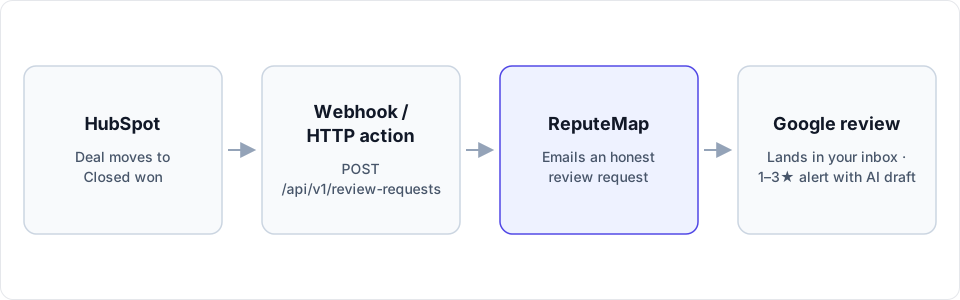
HubSpot stays in charge of timing, because it already knows when a job is won. ReputeMap does the part HubSpot doesn’t: it sends the review request for the right Google location, honors unsubscribes, and catches the review when it arrives.
Which HubSpot plan do I need?
The deciding question is whether your HubSpot subscription has the Send a webhook action. As of October 2026, HubSpot’s knowledge base lists it under Data ops actions for Data Hub Professional and Enterprise only, and says it works in every workflow type. Workflows themselves come with Professional and Enterprise subscriptions.
| Your HubSpot subscription (as of October 2026) | Workflows | Send a webhook action | How to send the review request |
|---|---|---|---|
| Free tools or a Starter plan | Not included | Not included | Zapier: HubSpot’s New Contact Property Change trigger on Lifecycle stage, then a Webhooks by Zapier POST (paid Zapier plan) |
| Marketing, Sales, Service, Smart CRM or Revenue Hub Professional or Enterprise, without Data Hub Professional | Included | Not included | The same Zapier route, or add Data Hub Professional |
| Data Hub Professional or Enterprise | Included | Included, along with Custom code | The workflow below, with no third tool in between |
Two things HubSpot rules out, so you don’t hunt for them: deal pipeline automation (the stage-change rules in pipeline settings) offers only tasks, internal email notifications and record edits, with no webhook. And the Custom code action has the same Data Hub requirement as Send a webhook.
On ReputeMap’s side nothing depends on the plan: API access is included on every plan, Solo at $19/mo too, and it works during the 14-day free trial. The Zapier route is written up step by step in our Zapier guide to Google review requests.
How to set it up: from Closed won to a review request
The recipe below uses a contact-based workflow. The request needs the customer’s email address, and in HubSpot that lives on the contact, not on the deal. HubSpot’s own lifecycle setting carries the “deal won” moment over to the contact.
1. Create a ReputeMap API key and find your location ID
In ReputeMap, go to Settings → API keys (owners and admins only) and create a key. It starts with rmk_ and is shown once, so store it like a password. Then list your locations and copy the id of the Google location customers should review:
curl https://api.reputemap.com/api/v1/locations \
  -H "Authorization: Bearer rmk_YOUR_KEY"
The full reference, including errors and credit headers, is in the ReputeMap API docs.
2. Let a won deal mark the contact as a customer
In HubSpot Settings, go to Objects → Contacts, open the Lifecycle Stage tab, then Automate, and switch on Set lifecycle stage when a deal is won. Choose Customer as the stage. The setting is off by default and is available on every HubSpot plan, free included. From then on, closing a deal as won moves its associated contacts to Customer.
3. Create the workflow and its trigger
Go to Automation → Workflows, click Create workflow and choose From scratch, with contacts as the enrolled records. For the enrollment trigger, choose When an event occurs, then the CRM category and Property value changed: Lifecycle stage changed to Customer. Under the refinement filters, add “Email is known” so contacts without an address never enroll.
If deals close before the work is delivered (a signed quote, for example), add a Delay before the webhook so the ask arrives after the job, not before it.
4. Add the Send a webhook action
Click the + icon, and under Data ops choose Send a webhook. Set it up like this:
- Method: POST
- Webhook URL:
https://api.reputemap.com/api/v1/review-requests - Authentication type: API key. API key name:
X-API-Key. API key location: Request header. In the API key dropdown, select a secret that holds yourrmk_key. - Request body: choose Customize request body and add the three keys from the table below, using Add property for HubSpot properties and Add static value for fixed values.
| JSON key | What to map in HubSpot | Notes |
|---|---|---|
location_id | One location: a static value with your location ID. Several: a contact property such as “ReputeMap location” | A dropdown property works well: branch names as labels, ReputeMap location IDs as the internal values |
email | Contact property Email | Required. The address the review request goes to |
name | Contact property First name | Optional. The customer’s first name |
The request HubSpot sends then looks like this:
POST https://api.reputemap.com/api/v1/review-requests
X-API-Key: rmk_YOUR_KEY

{"location_id": "8b1f…", "email": "customer@example.com", "name": "Sam"}
ReputeMap also accepts the key as Authorization: Bearer rmk_…; in HubSpot that means an API key name of Authorization and a secret whose value is Bearer rmk_…. The X-API-Key header is the simpler of the two.
5. Test it, then turn the workflow on
Expand Test action, pick a test contact that uses your own email address, and click Test. HubSpot doesn’t show the API key in test requests. A working setup returns {"status": "sent"}, and the review request lands in your inbox. After the test you can choose output fields: keep status and copy it to a contact property such as “Review request status” with an Edit record action, so your team can see who was asked.
What ReputeMap answers, and what HubSpot does with it
Every successful call returns one status:
sent: the review request went out.skipped: the address unsubscribed or is suppressed. That is a feature, not an error.already_requested: this address was already asked for this location. No second email goes out and no credit is used.failed: the email could not be sent.
Errors come back as HTTP codes: 401 for a missing or revoked key, 403 when the ReputeMap workspace has no active plan, 404 for a location ID that isn’t yours, 422 for an invalid field and 429 for the rate limit (60 requests a minute) or a spent monthly allowance.
HubSpot retries failed webhooks for up to three days, starting a minute after the failure, but it doesn’t retry 4XX errors except 429. So a typo in the key or the location ID fails once and stays failed: check the workflow history after the first real deals. Each org gets 1,000 API credits a month, shared with the MCP server and reset on the 1st; if your team closes more than that, ask ReputeMap for a higher allowance before the month runs out.
When should HubSpot ask, and who gets asked?
Ask when the work is done, and ask everyone. Closed won is the right moment when the deal is the job itself; when it isn’t, the Delay from step 3 moves the ask to the day the work is delivered.
ReputeMap never filters customers by sentiment. Every contact the workflow passes to ReputeMap gets the same email with the same Google link, and every email carries an unsubscribe link. That matters, because Google’s policy for Maps reviews forbids selectively soliciting positive reviews. The same policy rules out three other habits:
- No incentives: no discount, gift or payment for a review.
- No pressure on the premises: don’t ask customers to write the review in front of your staff.
- No asking customers to name an employee in the review.
Duplicates take care of themselves. If a contact ends up in the workflow twice, ReputeMap answers already_requested for the same location and sends nothing. An API request is a single ask, with no reminder. If you want one automatic reminder for everyone who hasn’t reviewed, load the list as an email campaign instead; campaigns with reminders come with Growth ($79/mo) and above. For the wording of the ask, our review request email templates are short and honest.
What happens in ReputeMap after the email goes out
The customer clicks through to Google’s review form for your location. When the review is posted, ReputeMap picks it up:
- New Google reviews land in one inbox across all your locations.
- A 1–3★ review (by default) triggers an alert by email, Telegram or WhatsApp. The alert email quotes an AI-drafted reply, and a Telegram private chat shows it with a ✅ Publish draft button. WhatsApp carries the alert only.
- The alert email carries Review & publish reply →, a personal, single-use, 7-day link to a page with no login: the review, the drafted reply you can edit, and one Publish to Google button. Here is how replying from the alert email works.
- Replies are drafted in the language the review was written in, never guessed from the reviewer’s name.
- Nothing is posted to Google until a person taps Publish, unless you switch on Auto-reply to new reviews (paid plans, 4–5★ by default).
- On the free trial, replies are drafted inside the first 2 alerts; on paid plans, inside every alert.
Can I see Google reviews inside HubSpot?
Not out of the box, and we’d rather say so here than after you’ve set it up. ReputeMap doesn’t push reviews into HubSpot, and it has no outbound webhooks.
A developer can pull them instead. GET /api/v1/reviews filters by location_id, rating_min/rating_max, has_reply and since_days, and GET /api/v1/stats returns totals, average rating and unanswered counts per location. A script on a schedule can read those and write them into HubSpot through HubSpot’s own API, for example as a note on the company. Every such call uses one API credit, so a nightly sync of one location costs about 30 credits a month. If nobody on your team writes code, keep reviews in ReputeMap and let HubSpot handle the ask.
When this isn’t the right fit
- You need SMS. ReputeMap sends review requests by email only.
- You want reviews written back into HubSpot records without code. That takes the scheduled script above.
- Your HubSpot subscription has no Send a webhook action, and Zapier isn’t an option. Then the ask has to come from somewhere else, such as a ReputeMap email campaign (Growth and above) loaded from a HubSpot export.
- You want an app with its own settings screen inside HubSpot. There isn’t one.
- You need Yelp, Facebook or industry review sites. ReputeMap is built for Google reviews.
Why HubSpot teams pick ReputeMap for Google reviews
- Google-first. The inbox, alerts, AI replies and review requests are all built around Google Business Profile.
- Locations are in the price. Published plans: Solo $19/mo (1 location), Starter $29/mo (5), Growth $79/mo (15), Pro $129/mo (30), Portfolio $149/mo (75) and Network $189/mo (200). No per-location fees and no sales call.
- Reply from the alert email without logging in. A manager can answer a bad review from the email itself.
- AI drafts in the reviewer’s language. A review in Spanish gets a Spanish draft.
- API and MCP on every plan. The same 1,000 monthly credits cover this HubSpot workflow and an AI assistant reading your reviews over MCP.
- White-label reports from Pro, for agencies that run HubSpot for clients.
- A 14-day free trial, card required, cancel anytime.
Automating the ask is one lever; the guide to getting more Google reviews covers the others, from the review link to the Business Profile itself.
Sources (checked October 1, 2026)
- HubSpot: Use webhooks with HubSpot workflows (subscription, request body, API key authentication, retries)
- HubSpot: Choose your workflow actions (Send a webhook and Custom code: Data Hub Professional and Enterprise)
- HubSpot: Create workflows and Set event enrollment triggers
- HubSpot: Automatically set and sync record lifecycle stages
- HubSpot: Set up pipeline automations
- Zapier: HubSpot integrations (New Contact Property Change, Updated Deal Stage)
- Google: Maps user-generated content policy
HubSpot changes plan names and packaging; if your account shows something different, HubSpot’s own subscription page is the final word.
Start your 14-day free trial (card required, cancel anytime). Setup takes about 15–20 minutes: connect your Google Business Profile, create an API key, and paste it into the HubSpot workflow. Your next Closed won deal sends the first review request.
Frequently asked questions
Does ReputeMap have a native HubSpot app?
No. ReputeMap has no app in the HubSpot App Marketplace. The integration is HubSpot's own Send a webhook workflow action calling ReputeMap's REST endpoint, POST /api/v1/review-requests, with your API key in a request header. Setup takes about 15–20 minutes.
Which HubSpot plan do I need?
As of October 2026, HubSpot lists the Send a webhook workflow action for Data Hub Professional and Enterprise, and workflows themselves need a Professional or Enterprise subscription. On HubSpot's free tools or a Starter plan, use Zapier instead: its HubSpot trigger New Contact Property Change plus a Webhooks by Zapier POST step. On ReputeMap's side, API access is included on every plan, the 14-day free trial too.
Can I see Google reviews inside HubSpot?
Not out of the box. ReputeMap doesn't push reviews into HubSpot and has no outbound webhooks. A developer can pull reviews and stats on a schedule from GET /api/v1/reviews and GET /api/v1/stats and write them into HubSpot through HubSpot's own API; each call uses one of the org's 1,000 monthly API credits. Without that script, reviews, alerts and replies stay in ReputeMap.
Does it send SMS review requests?
No. ReputeMap sends review requests by email only. If your customers only answer text messages, this setup isn't the right fit.
What happens if the same customer wins a second deal?
They are not emailed twice for the same location. ReputeMap answers a repeat request with already_requested, sends nothing and doesn't use a credit. A request for a different location is a separate ask and does send.
Will HubSpot retry a request that fails?
HubSpot retries failed webhooks for up to three days, but it doesn't retry 4XX errors other than 429. ReputeMap returns 401 for a missing or revoked key, 404 for an unknown location ID, 422 for an invalid field and 429 when the rate limit or the month's 1,000 credits are used up; credits reset on the 1st.
About the author
Founder, ReputeMap
I build and run ReputeMap. Before it, I spent 12+ years as a senior and lead software engineer on big-data systems and backend services.
Ready to manage Google reviews the smart way?
Agentic Reputation Platform for Multi-Location Brands. Start a 14-day free trial on any plan (card required). Setup takes about 3 minutes.
Get started