Google Review Requests From a Salesforce Flow
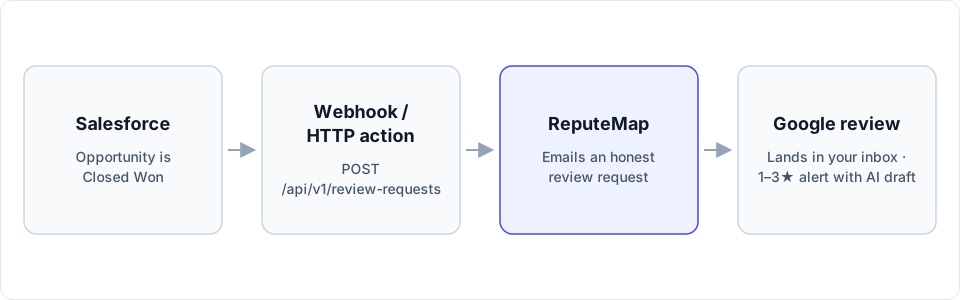
A record-triggered Flow calls ReputeMap's API when an Opportunity is won, a Case closes or a Work Order is completed, and the customer gets a plain email asking for a Google review. The API key stays in a Named Credential, out of the flow.
 By Yaro (Yaroslav Mykhailov), founder of ReputeMap · Updated
Reading this for your own business? See where it stands on Google right now. It's free, with no signup.
Live from Google · free · nothing is stored
Does ReputeMap integrate with Salesforce?
Yes — you can send Google review requests from Salesforce automatically: a record-triggered Flow fires when an Opportunity is won (or a Case closes, or a Work Order is completed), an HTTP Callout action posts the customer’s email, first name and Google location to ReputeMap’s API, and ReputeMap emails that customer an honest request to review you on Google.
There is no native ReputeMap app on AppExchange. The integration is one API call from Salesforce’s own Flow Builder, authenticated by a Named Credential, and an admin who has built a flow before can set it up in about 15–20 minutes.
Which Salesforce objects can trigger the ask?
Pick the object whose status change means “the customer got what they paid for”. For a contractor that is usually a completed Work Order; for a clinic or a service desk, a closed Case; for a business where the sale is the service, a won Opportunity. The flow is the same in all three; only the entry condition and the field paths change.
| Object and moment | Entry condition | email comes from | name comes from | location_id comes from |
|---|---|---|---|---|
| Opportunity: deal won | IsWon Equals True | The primary contact: Opportunity Contact Role where Is Primary is true, then Contact > Email | Contact > First Name | A custom Account field, for example ReputeMap_Location_ID__c |
| Case: ticket closed | IsClosed Equals True | ContactEmail on the Case | Contact > First Name | The same Account field, through the Case’s Account |
| Work Order: job completed | Status Equals Completed | Contact > Email on the Work Order | Contact > First Name | The Account field, or a field on the Work Order if one customer is served by several branches |
Notes from Salesforce’s object reference that save debugging time:
IsWonandIsClosedcan’t be set directly; Salesforce sets them from the Opportunity stage and the Case status, which makes them steadier conditions than a stage name your team might rename.- The
ContactIdfield on an Opportunity is filled only when the Opportunity is created. The primary Opportunity Contact Role is the reliable source of the customer’s email, so reps need to add a contact role. - Work Order statuses can be customized. If your org renamed Completed, use your own value.
For a single-location business, skip the Account field and put the location ID in a flow constant.
Which Salesforce edition do I need?
As of October 2026, according to Salesforce Help:
- HTTP Callout is generated as an External Service, and External Services is available in Enterprise, Performance, Unlimited and Developer Editions.
- Flow Builder also exists in Essentials, Pro Suite and Professional, but without External Services there is no HTTP Callout action. Apex, the code route, isn’t an option on those editions either.
- Permissions: building and activating flows needs Manage Flow; creating the External Credential, the Named Credential and the HTTP Callout action needs Customize Applications.
- API access, which outside tools use to read Salesforce, isn’t included in Professional Edition by default (it’s a paid add-on) and isn’t available for Essentials at all.
On Essentials, or on Professional with no API add-on, the practical route is a Salesforce report export loaded into a ReputeMap email campaign (Growth and above). On ReputeMap’s side, API access is included on every plan, Solo at $19/mo too, and the 14-day free trial counts.
Build it: credential, callout, flow
1. Create a ReputeMap API key and copy your location ID
In ReputeMap, go to Settings → API keys (owners and admins only) and create a key. It starts with rmk_ and is shown once. Then call GET /api/v1/locations and copy the id of each Google location; the ReputeMap API docs have the request and the response format.
2. Store the key in an External Credential
In Setup → Named Credentials, open the External Credentials tab and click New:
- Authentication Protocol: Custom.
- Under Principals, click New: give the principal a name, keep the Named Principal identity type, and add an authentication parameter with Name
ApiKeyand Value set to yourrmk_key. - Under Custom Headers, click New: Name
X-API-Key, Value{!$Credential.ReputeMap.ApiKey}, whereReputeMapis the External Credential’s API name. - Map the principal to a permission set, assign that permission set to every user whose record changes run the callout, and grant the access to user external credentials that Salesforce’s authentication guidelines list.
3. Create the Named Credential
On the Named Credentials tab, click New: label it “ReputeMap API”, set URL to https://api.reputemap.com, and choose the External Credential from step 2. Clear Generate Authorization Header (the key travels in your custom header) and turn on Allow Formulas in HTTP Header, because the header value is a merge field.
4. Create the HTTP Callout action
In Flow Builder, add an Action element and click Create HTTP Callout:
- External service name:
ReputeMapAPI(letters and numbers only), with the Named Credential from step 3. - Label: Send Review Request. Method: POST. URL path:
/api/v1/review-requests. - Sample request:
{"location_id": "00000000-0000-0000-0000-000000000000", "email": "customer@example.com", "name": "Sam"} - Sample response:
{"status": "sent"}
Salesforce generates the request and response data structures from those two samples and adds the action to the flow’s Actions list.
5. Build the record-triggered flow
From Setup, click New Flow, choose Triggered Automations, then Record-Triggered Flow. In Configure Start:
- Object: Opportunity (or Case, or Work Order).
- Trigger the Flow When: A record is created or updated.
- Set Entry Conditions: All Conditions Are Met (AND), with the condition from the table above. Salesforce runs the flow when a record goes from not meeting the condition to meeting it, so later edits to a won Opportunity don’t fire it again.
- Optimize the Flow for: Actions and Related Records, then turn on Add Asynchronous Path.
On the Run Asynchronously path, add the elements in this order: a Get Records for the primary Opportunity Contact Role (Opportunity flows only), a Decision that ends the flow when there is no email, an Assignment that fills the request body, and the Send Review Request action with that body. The callout must sit on the asynchronous path: Salesforce blocks callouts while a record is being saved.
The request the flow sends:
POST https://api.reputemap.com/api/v1/review-requests
X-API-Key: rmk_YOUR_KEY            (added by the Named Credential)

{"location_id": "{!$Record.Account.ReputeMap_Location_ID__c}", "email": "{!ContactEmail}", "name": "{!ContactFirstName}"}
Activate the flow in a sandbox first, close a test Opportunity with your own email on the primary contact, and check that ReputeMap answers sent.
What the Flow gets back
A successful call returns a status the flow can store, for example in a “Review request status” field on the Opportunity:
sent: the email went out.skipped: the customer unsubscribed or the address is suppressed.already_requested: this address was already asked for this location, so nothing is sent and no credit is used.failed: the email could not be sent.
Salesforce treats any response code of 300 or higher as an error and sends it down the action’s fault path. Give the action a fault path that emails your admin, because the codes mean different fixes: 401 is a missing or revoked key, 403 means the ReputeMap workspace has no active plan, 404 is a location ID that isn’t yours, 422 is an invalid field such as a malformed email, and 429 is the rate limit (60 requests a minute) or the month’s 1,000 credits, which reset on the 1st.
Who gets asked, and when
Ask everyone, right after the work is done. ReputeMap sends every customer the same email with the same Google link and an unsubscribe link; it never screens customers by how happy they seem. Google’s policy for Maps reviews forbids selectively soliciting positive reviews, and it also rules out:
- incentives of any kind for a review, from discounts to gifts;
- pressuring customers to write a review while they are on your premises;
- asking customers to mention a staff member in the review.
Repeat customers are handled for you. If a second Opportunity closes for the same contact and location, ReputeMap answers already_requested and sends nothing. Each API request is a single ask, with no reminder; if you want an automatic reminder, campaigns with reminders come with Growth ($79/mo) and above. The wording of the email matters as much as the timing, and our review request templates keep it short and honest.
After the ask: what ReputeMap does
- The customer lands on Google’s review form for the right location, and the new review shows up in ReputeMap’s inbox next to every other location’s reviews.
- A 1–3★ review (by default) triggers an alert by email, Telegram or WhatsApp. The alert email quotes an AI-drafted reply, a Telegram private chat shows it with a ✅ Publish draft button, and WhatsApp carries the alert only.
- Review & publish reply → in the alert email opens a personal, single-use, 7-day link to a page with no login, where the drafted reply can be edited and published to Google. More on replying from the alert email.
- The reply is drafted in the language the review was written in, never guessed from the reviewer’s name.
- Nothing is posted to Google until a person taps Publish, unless you switch on Auto-reply to new reviews (paid plans, 4–5★ by default).
- On the free trial, replies are drafted inside the first 2 alerts; on paid plans, inside every alert.
Getting reviews back into Salesforce
ReputeMap doesn’t write reviews into Salesforce, and it has no outbound webhooks to call your org. The read side exists, though: GET /api/v1/reviews filters by location, rating range, reply status and a trailing number of days, and GET /api/v1/stats returns per-location totals, average rating and unanswered counts. A scheduled Apex job can call both through the same Named Credential and store the numbers on the Account. Each call uses one of the org’s 1,000 monthly API credits, shared with the MCP server. That is developer work; if you don’t have a developer, read reviews in ReputeMap and keep Salesforce for the trigger.
When Salesforce plus ReputeMap isn’t the right fit
- You need SMS review requests. ReputeMap is email only.
- You want reviews on Salesforce records without code. It takes the scheduled job above.
- Your edition has no HTTP Callout (Essentials, Pro Suite, Professional) and a regular report export isn’t acceptable.
- You need an AppExchange package that your security review can approve as an installed app. ReputeMap isn’t one.
- You track Yelp or industry sites as closely as Google. ReputeMap is built for Google reviews.
Why Salesforce admins pick ReputeMap for Google reviews
- One endpoint, no package. Nothing to install or upgrade in your org: a Named Credential and one HTTP Callout.
- Locations included in the plan price. Published plans: Solo $19/mo (1 location), Starter $29/mo (5), Growth $79/mo (15), Pro $129/mo (30), Portfolio $149/mo (75), Network $189/mo (200). Branch-heavy orgs pay by plan, not per location; see multi-location review management for how the inbox and reports work across branches.
- Google-first: the inbox, alerts, AI replies and requests are built around Google Business Profile.
- Reply from the alert email without logging in, with the AI draft in the reviewer’s language.
- API and MCP on every plan, 1,000 credits a month shared between them.
- White-label reports from Pro, if you run Salesforce for clients.
- A 14-day free trial, card required, cancel anytime.
On Professional Edition with the API add-on, Zapier can send the same request from a Salesforce trigger (its Webhooks step needs a paid Zapier plan, Professional or higher); see Google review requests with Zapier.
Sources (checked October 1, 2026)
- Salesforce Help: Connecting to an API without a connector using HTTP Callout, Configure an HTTP Callout action and HTTP Callout considerations and limits
- Salesforce Help: Guidelines for authenticating HTTP Callout actions and Use API keys in custom headers with Named Credentials
- Salesforce Help: External Services (editions), Supported editions for Flow Builder and Salesforce editions with API access
- Salesforce Help: Record-triggered flow considerations (asynchronous path for callouts)
- Salesforce object reference: Opportunity, OpportunityContactRole, Case and WorkOrder
- Google: Maps user-generated content policy
Start your 14-day free trial (card required, cancel anytime). Setup takes about 15–20 minutes: connect your Google Business Profile, create an API key, store it in a Named Credential, and the next won Opportunity sends the first review request.
Frequently asked questions
Is there a ReputeMap app on AppExchange?
No. ReputeMap has no AppExchange package. The integration is Salesforce's own Flow Builder: a record-triggered flow with an HTTP Callout action that posts to ReputeMap's endpoint, POST /api/v1/review-requests, through a Named Credential that holds the API key. An admin who has built a flow before can set it up in about 15–20 minutes.
Which Salesforce edition do I need?
As of October 2026, the HTTP Callout action runs on External Services, which Salesforce lists for Enterprise, Performance, Unlimited and Developer Editions. Essentials, Pro Suite and Professional have Flow Builder but not External Services, and Apex isn't an option there either. The admin needs the Manage Flow and Customize Applications permissions.
Why does the flow need an asynchronous path?
Salesforce blocks callouts to outside services while a record is being saved, so a record-triggered flow that calls ReputeMap in its synchronous run fails. Optimize the flow for Actions and Related Records and put the callout on the Run Asynchronously path, which runs after the Opportunity, Case or Work Order is saved.
Can I see Google reviews inside Salesforce?
Not out of the box. ReputeMap doesn't push reviews into Salesforce and has no outbound webhooks. A developer can pull reviews and stats on a schedule from GET /api/v1/reviews and GET /api/v1/stats, for example with a scheduled Apex job, and store them on the Account; each call uses one of the org's 1,000 monthly API credits.
Does ReputeMap send SMS review requests?
No. Review requests go out by email only. If your customers only respond to text messages, a texting tool is the better fit.
About the author
Founder, ReputeMap
I build and run ReputeMap. Before it, I spent 12+ years as a senior and lead software engineer on big-data systems and backend services.
Ready to manage Google reviews the smart way?
Agentic Reputation Platform for Multi-Location Brands. Start a 14-day free trial on any plan (card required). Setup takes about 3 minutes.
Get started