Pipedrive Google Review Requests, Sent When a Deal Is Won
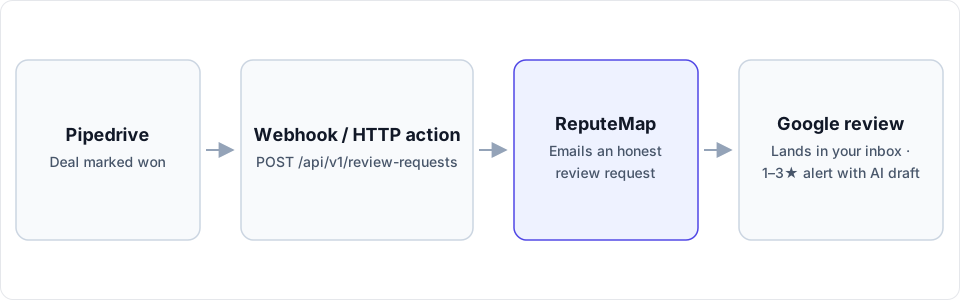
A Pipedrive automation calls ReputeMap's API the moment a deal is marked won, and the customer gets an honest email asking for a Google review. The plan it needs, the exact webhook, and the routes for every other plan.
 By Yaro (Yaroslav Mykhailov), founder of ReputeMap · Updated
Reading this for your own business? See where it stands on Google right now. It's free, with no signup.
Live from Google · free · nothing is stored
How do you send a Google review request when a Pipedrive deal is won?
Yes — you can send Google review requests from Pipedrive automatically: an automation fires when a deal’s status changes to won, its webhook action posts the contact person’s email and first name to ReputeMap’s API, and ReputeMap emails that customer an honest request to review the right Google location.
Does ReputeMap integrate with Pipedrive? Yes, through Pipedrive’s own Automations. ReputeMap has no native app in the Pipedrive Marketplace; it’s an API call from a Pipedrive automation, and setup takes about 15–20 minutes. Two things decide whether it fits: your Pipedrive plan (the webhook action needs Growth or higher, as of October 2026) and whether your customers can be asked by email, because ReputeMap sends no SMS.
Which Pipedrive plan do you need?
Pipedrive renamed its plans in 2025, and its help articles use both sets of names. Mapped together:
| Pipedrive plan | Name before 2025 | Automations | Webhook action in automations | Active automations per company |
|---|---|---|---|---|
| Lite | Essential | No | No | None |
| Growth | Advanced | Yes | Yes | 50 |
| Premium | Professional, Power | Yes | Yes | 150 |
| Ultimate | Enterprise | Yes | Yes | 250 |
Checked October 1, 2026 in Pipedrive’s help center: Automations: webhook requests, What’s new in Pipedrive plans? and Automation limits. The webhook action is for global admins only. Plain account-level webhooks, the kind a developer subscribes a script to, are on every plan, Lite included.
How do you set up the deal-won automation?
1. Get a ReputeMap API key and location ID
In ReputeMap, open Settings → API keys (owners and admins only) and create a key. It starts with rmk_ and is shown once, so store it like a password. Then list your locations and copy the id of the one this pipeline sells for:
curl https://api.reputemap.com/api/v1/locations \
  -H "Authorization: Bearer rmk_YOUR_KEY"
2. Create an automation webhook in Pipedrive
On Pipedrive’s Webhooks page, click + Webhooks → Automation webhook. Name it “ReputeMap review request” (you’ll pick it by name later) and set the endpoint URL to:
https://api.reputemap.com/api/v1/review-requests?api_key=rmk_YOUR_KEY&Two Pipedrive rules shape that URL. Its automation webhooks authenticate with an HTTP Basic username and password, and the help article describes no custom-header field, so the key travels in ReputeMap’s api_key query parameter (the documented fallback for tools that can’t set headers) and the username and password stay empty. And the endpoint URL must end with /, &, ? or =, which is what the final & is for; ReputeMap ignores it.
3. Build the automation
- Go to Tools and apps → Automations and click + Automation.
- Choose an Event trigger: Deal, updated.
- Add the condition Deal status has changed to Won. Pipedrive’s help center notes that an “is” condition on an update trigger needs an active condition like “has changed to” before the automation fires.
- Add an action: Webhook. Select “ReputeMap review request”, set Method to POST, leave the path empty, and switch the body to the raw builder.
- Paste the JSON below. Where the brackets are, click the field button and insert the deal’s contact person’s email and first name.
The request Pipedrive sends, with the raw builder’s JSON as its body:
POST https://api.reputemap.com/api/v1/review-requests?api_key=rmk_YOUR_KEY&

{
  "location_id": "8b1f2c3d-…",
  "email": "[contact person's email, inserted with the field button]",
  "name": "[contact person's first name, inserted with the field button]"
}
Mark a test deal won with yourself as the contact person, then check the automation’s history. A {"status": "sent"} answer means the ask is on its way; every status and error code is listed in the ReputeMap API docs. If your account’s field list doesn’t offer the contact person’s email for a deal trigger, use the script route below, which looks the person up.
| ReputeMap field | Required | Pipedrive value | Notes |
|---|---|---|---|
location_id | Yes | The ID from step 1, typed into the body | One automation per location, or one per pipeline if each pipeline sells for one location |
email | Yes | The deal’s contact person → email | Blank or malformed: HTTP 422, nothing sent |
name | No | The deal’s contact person → first name | The email opens “Hi Sam,” or just “Hi,“ |
Does “won” mean the job is done?
In many pipelines it doesn’t. A deal is often marked won when the contract is signed, and the work happens weeks later, and a review request that arrives before the work is a request for a review of a promise. Three ways to line it up:
- Add a delay step between the condition and the webhook, sized to your usual delivery time.
- Trigger on delivery instead: a stage or custom field your team sets when the job is finished, with “has changed to” on that field.
- Keep the won trigger where the sale and the service are the same day: a repair paid on the spot, a one-visit job.
Whichever you choose, ask every customer the same way. ReputeMap doesn’t support review gating in any form, and Google’s Maps user-contributed content policy prohibits selectively soliciting positive reviews, offering incentives such as discounts or free services, pressuring customers to review while on the premises, and having staff request reviews that name a staff member.
Repeat customers are handled for you. If the same address was already asked for the same location, ReputeMap answers already_requested, sends no second email and uses no credit. An address that unsubscribed is answered skipped.
What if your plan has no automations?
Two routes work on any Pipedrive plan:
- A webhook plus a small script. Subscribe a webhook to
change.deal(Settings → Tools and apps → Webhooks, orPOST /v1/webhooksin Pipedrive’s API). Each event carries the deal’s current data and apreviousblock with only the fields that changed, so the script acts when the status has just become won, looks up the person by the deal’sperson_idwith Pipedrive’s API, and posts the email to ReputeMap. Pipedrive retries a failed delivery three more times (after 3, 30 and 150 seconds), and ReputeMap’salready_requestedmakes a retried send harmless. Details are in Pipedrive’s webhooks guide. - Zapier. Save a Pipedrive filter for won deals, use Zapier’s Deal Matching Filter trigger, and add a webhook POST to the same endpoint (Webhooks by Zapier needs a paid Zapier plan, Professional or higher). The step-by-step version is our Zapier review request recipe.
What happens after the customer is handed to ReputeMap?
| Moment | What ReputeMap does |
|---|---|
| The ask | One email under your business name with a one-click unsubscribe. An API request is a single ask with no reminder; campaigns with automatic reminders come with Growth ($79/mo) and above. |
| A review arrives | It appears in ReputeMap’s review inbox with that location’s other reviews. |
| The review is 1–3★ | An alert goes out by email, Telegram or WhatsApp. The email quotes an AI-drafted reply and carries Review & publish reply →, a personal, single-use, 7-day link to a page with no login. WhatsApp carries the alert only. |
| You reply | Drafts are written in the language the review was written in. On paid plans you can switch on Auto-reply to new reviews, which posts the AI draft to new 4–5★ reviews by default. |
On the free trial, replies are drafted inside the first 2 alerts; on paid plans, inside every alert. Nothing is posted to Google until a person taps Publish, unless you switch on Auto-reply to new reviews (paid plans, 4–5★ by default).
What the email says matters as much as when it goes; our review request templates cover the wording.
Can you get the reviews back into Pipedrive?
Not without code. ReputeMap doesn’t push reviews into Pipedrive and has no outbound webhooks. A developer can read GET /api/v1/reviews (filters: location_id, rating_min, rating_max, has_reply, since_days) and GET /api/v1/stats on a schedule and write them into Pipedrive, as notes on an organization, for example. Each call uses one of the 1,000 API credits your ReputeMap workspace gets each month.
When isn’t this the right fit?
- You’re on Lite and won’t add a script or Zapier. There’s no automation to call ReputeMap from.
- You’re not a global admin and can’t get one to add the webhook action.
- Your customers only answer texts. ReputeMap sends review requests by email only.
- You want reviews visible on Pipedrive deals with no code.
- You win more than about 1,000 deals a month. That’s the monthly API allowance per workspace (60 requests a minute); talk to the founder first.
Why do Pipedrive teams pick ReputeMap for Google reviews?
- Google reviews are the whole product. The ask, the inbox, the replies, the alerts and the reports, all for Google.
- Published prices with locations included: Solo $19/mo for 1 location, Starter $29 for 5, Growth $79 for 15, Pro $129 for 30, Portfolio $149 for 75, Network $189 for 200.
- Answer a bad review from the alert email. Review & publish reply → needs no login.
- AI drafts in the reviewer’s language.
- API and MCP access on every plan, so this automation runs from Solo up and during the trial.
- White-label reports from Pro for agencies whose clients run Pipedrive.
- 14-day free trial, card required, cancel anytime.
For what to do around the ask (QR codes at the counter, replying to every review), see how to get more Google reviews.
Start your 14-day free trial: card required, cancel anytime. Connecting your Google profile takes about 3 minutes, and the automation about 15 more.
Frequently asked questions
Is there a ReputeMap app in the Pipedrive Marketplace?
No. ReputeMap has no native app in the Pipedrive Marketplace. The integration is the webhook action in a Pipedrive automation calling ReputeMap's REST API (POST https://api.reputemap.com/api/v1/review-requests) when a deal's status changes to won. Setup takes about 15–20 minutes.
Which Pipedrive plan includes the webhook action in automations?
Growth or higher, as of October 2026. Pipedrive's help center says automations and their webhook action need the Advanced plan or higher, and its 2025 plan rename turned Advanced into Growth, so that means Growth, Premium or Ultimate. Lite has no automations. Only global admins can add the webhook action.
Why does the ReputeMap key go in the webhook URL instead of a header?
Pipedrive's automation webhooks authenticate with an HTTP Basic username and password, and its help article describes no custom-header field. ReputeMap accepts the key three ways, and the api_key query parameter is the one that fits. Leave Pipedrive's username and password empty, and revoke the key in ReputeMap whenever you need to.
What if the same person wins another deal later?
ReputeMap won't email them twice for the same location: the API answers already_requested, sends no second email and uses no credit. A deal at a different location is a separate ask, and an address that unsubscribed is answered skipped.
Can I do this on Pipedrive Lite?
Not with automations, which Lite doesn't include. Account-level webhooks are on every Pipedrive plan, so a developer can subscribe to deal changes and call ReputeMap from a small script, or you can use Zapier's Pipedrive trigger with a webhook step.
About the author
Founder, ReputeMap
I build and run ReputeMap. Before it, I spent 12+ years as a senior and lead software engineer on big-data systems and backend services.
Ready to manage Google reviews the smart way?
Agentic Reputation Platform for Multi-Location Brands. Start a 14-day free trial on any plan (card required). Setup takes about 3 minutes.
Get started