Zoho CRM Google Review Requests, Sent on Closed Won
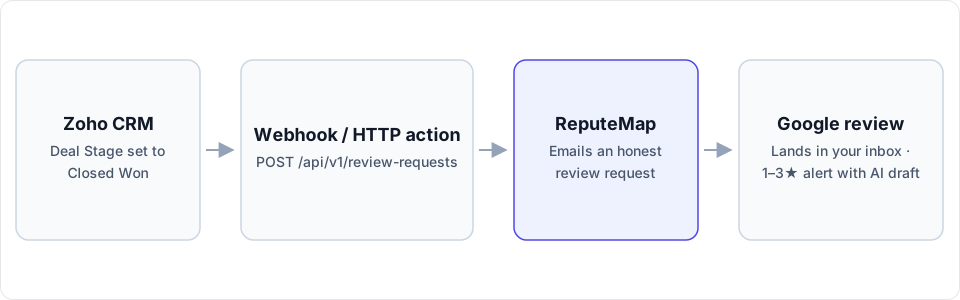
A Zoho CRM workflow rule calls ReputeMap's API when a deal reaches Closed Won, and the customer gets an honest email asking for a Google review. Which editions can run it, the exact webhook, and a Deluge version.
 By Yaro (Yaroslav Mykhailov), founder of ReputeMap · Updated
Reading this for your own business? See where it stands on Google right now. It's free, with no signup.
Live from Google · free · nothing is stored
Can Zoho CRM send Google review requests automatically?
Yes — you can send Google review requests from Zoho CRM automatically: a workflow rule on the Deals module fires when a deal’s Stage changes to Closed Won, its webhook posts the deal contact’s email and first name to ReputeMap’s API, and ReputeMap emails that customer an honest request to review the right Google location.
Does ReputeMap integrate with Zoho CRM? Yes, through Zoho’s own automation. ReputeMap has no native app in the Zoho Marketplace; it’s an API call from a Zoho CRM workflow rule, and setup takes about 15–20 minutes. The one hard requirement is on Zoho’s side: workflow webhooks need the Professional edition or higher, as of October 2026.
Which Zoho CRM editions can run it?
Two Zoho features can make the call: a webhook (no code) and a Deluge function (a few lines of code). Each edition has a different mix:
| Zoho CRM edition | Price per user/month, annual · monthly billing | Webhooks in workflow rules | Deluge functions |
|---|---|---|---|
| Free | Free for 3 users | No | No |
| Standard | $14 · $20 | No | No |
| Professional | $23 · $35 | Yes: 50,000 calls a day or 100 per user license, whichever is lower | No |
| Enterprise | $40 · $50 | Yes: 500,000 calls a day or 500 per user license | Yes |
| Ultimate | $52 · $65 | Yes: 1,000,000 calls a day or 1,000 per user | Yes |
Checked October 1, 2026 on Zoho’s edition comparison (USD, before tax) and its help article on webhooks. The Starter edition listed on the same page has no webhooks either.
The daily caps are far above review-request volume; ReputeMap’s own allowance (1,000 API credits a month per workspace, 60 requests a minute) is the number to watch. On Free or Standard, skip the automation: send asks from ReputeMap itself, one customer at a time on any plan, or as an email campaign with automatic reminders on Growth ($79/mo) and above.
How do you build the Closed Won webhook in Zoho CRM?
Step 1: get a ReputeMap API key and location ID
In ReputeMap, open Settings → API keys (owners and admins only) and create a key. It starts with rmk_ and is shown once. Then list your locations; each comes back with the id you’ll send:
curl https://api.reputemap.com/api/v1/locations \
  -H "Authorization: Bearer rmk_YOUR_KEY"
Step 2: configure the webhook
In Zoho CRM, go to Setup → Automation → Actions → Webhooks and click Configure Webhook:
- Name: ReputeMap review request. Method: POST. URL to Notify:
https://api.reputemap.com/api/v1/review-requests. Module: Deals. - Authorization Type: General. In the header, add two custom parameters:
Authorizationwith the valueBearer rmk_YOUR_KEY, andContent-Typewithapplication/json. (X-API-Key: rmk_…works in place of the first.) - Body: choose Raw, format JSON, and type
#to insert merge fields: pick the deal’s contact (the Contact Name lookup), then its Email and First Name. - Save.
The request Zoho will send:
POST https://api.reputemap.com/api/v1/review-requests
Authorization: Bearer rmk_YOUR_KEY
Content-Type: application/json

{
  "location_id": "8b1f2c3d-…",
  "email": "${Contacts.Email}",
  "name": "${Contacts.First Name}"
}
Insert the two ${…} values with the # picker rather than typing them, so the field names match your account exactly.
Step 3: create the workflow rule
- Go to Setup → Automation → Workflow Rules and click Create Rule. Module: Deals; name it “Review request on Closed Won”.
- When: Record Action → Edit → Specific field(s) gets modified, and choose Stage.
- Condition: All records that match the criteria → Stage is Closed Won.
- Instant Actions → Webhook: select “ReputeMap review request”, click Associate, then Save.
Win a test deal whose contact has your own email address. A {"status": "sent"} answer means the ask is on its way; the full list of responses and error codes is in the ReputeMap API docs.
| ReputeMap field | Required | Zoho CRM source | Notes |
|---|---|---|---|
location_id | Yes | A fixed ID, or a Deals custom field (next section) | Routes the ask to the right Google listing |
email | Yes | The deal’s contact → Email | Blank or malformed: HTTP 422, nothing sent |
name | No | The deal’s contact → First Name | The email opens “Hi Sam,” or just “Hi,“ |
How do you route deals to the right Google location?
A business with one Google location pastes one location_id and is done. With several locations, or an agency running Zoho for several clients, the location belongs on the deal:
- Add a single-line custom field to Deals, for example “ReputeMap Location ID”.
- Fill it with the ID of the location that did the work (the IDs come from
GET /api/v1/locations, each with a readable label). - Replace the fixed ID in the webhook body with that field, inserted with
#.
One webhook and one workflow rule then serve every location. Each location’s reviews stay separate in ReputeMap, and on Growth and above the multi-location dashboard rolls them up with reply coverage and response times.
Is there a Deluge version?
On Enterprise and Ultimate, a Deluge function can replace the webhook. It does two things a webhook can’t: it skips deals that have no contact email instead of making a call that fails, and it logs ReputeMap’s answer. In the same workflow rule, choose Instant Actions → Function, write your own, and map a dealId argument to the deal’s ID:
deal = zoho.crm.getRecordById("Deals", dealId.toLong());
contact = deal.get("Contact_Name");
if(contact != null)
{
	person = zoho.crm.getRecordById("Contacts", contact.get("id").toLong());
	email = person.get("Email");
	if(email != null && email != "")
	{
		payload = Map();
		payload.put("location_id", "8b1f2c3d-…");
		payload.put("email", email);
		payload.put("name", ifnull(person.get("First_Name"), ""));
		response = invokeurl
		[
			url: "https://api.reputemap.com/api/v1/review-requests"
			type: POST
			body: payload.toString()
			headers: {"Authorization":"Bearer rmk_YOUR_KEY","Content-Type":"application/json"}
		];
		info response;
	}
}
Anyone who can edit the function can read the key, so treat that access like access to the key itself; you can revoke a key in ReputeMap at any moment and issue a new one.
When should the request go out, and what about duplicates?
After the work, not after the signature. If Closed Won means the job is done, the instant action is right. If delivery comes later, attach the same webhook as a scheduled action instead (Zoho runs those minutes, hours or days after the rule fires, up to five per rule), or trigger on a later stage your team sets when the job is delivered.
Ask everyone the same way. ReputeMap doesn’t support review gating in any form. Google’s Maps user-contributed content policy prohibits selectively soliciting positive reviews, offering incentives such as discounts or free services, pressuring customers to review while on the premises, and having staff request reviews that name a staff member.
Duplicates cost nothing. If a contact wins a second deal at the same location, ReputeMap answers already_requested, sends no second email and uses no credit. An address that unsubscribed is answered skipped. A deal at a different location is a separate ask.
What does ReputeMap do once Zoho hands over the customer?
The customer receives one email under your business name with a one-click unsubscribe. An API request is a single ask, so no automatic reminder follows; campaigns with reminders are a Growth-and-above feature sent from ReputeMap. The request templates show the kind of short, plain wording that gets answered.
When the review is posted, it appears in ReputeMap’s review inbox with the location’s other reviews. A 1–3★ review also raises an alert by email, Telegram or WhatsApp. The alert email quotes an AI-drafted reply and carries Review & publish reply →, a personal, single-use, 7-day link to a page with no login, where you can edit the draft and publish it to Google. WhatsApp carries the alert only. On the free trial, replies are drafted inside the first 2 alerts; on paid plans, inside every alert.
Drafts are written in the language the review was written in, never guessed from the reviewer’s name. On paid plans you can switch on Auto-reply to new reviews, which posts the inbox’s AI draft to new 4–5★ reviews by default; it is off until an owner or admin turns it on. Nothing is posted to Google until a person taps Publish, unless you switch on Auto-reply to new reviews (paid plans, 4–5★ by default).
Can you see the reviews inside Zoho CRM?
Not without code. ReputeMap doesn’t push reviews into Zoho CRM and has no outbound webhooks. What the API does offer is a read side: GET /api/v1/reviews (filter by location_id, rating_min, rating_max, has_reply, since_days) and GET /api/v1/stats (average rating, star breakdown and unanswered count per location).
On Enterprise and Ultimate, Zoho’s Schedules can run a Deluge function once a day that calls GET /api/v1/reviews?since_days=1 and writes each review into a custom module or a note on the account. A daily run uses about 30 of your 1,000 monthly credits. It’s a reasonable weekend project for a Zoho developer, and it is code your team owns.
When isn’t this the right fit?
- You’re on Zoho CRM Free or Standard and won’t upgrade. There are no workflow webhooks to call ReputeMap with; send the asks from ReputeMap instead.
- Your customers only answer texts. ReputeMap sends review requests by email only.
- You want reviews inside Zoho CRM with no code. Today that takes the scheduled function above.
- You close more than about 1,000 deals a month. That’s ReputeMap’s monthly API allowance per workspace; ask the founder about a higher one before you switch the rule on.
Why do Zoho CRM teams pick ReputeMap for Google reviews?
- It does one job: Google reviews. Requests, the inbox, replies, alerts and reports for Google, rather than a module bolted onto a suite.
- Every location is in the price. Solo $19/mo covers 1 location, Starter $29 covers 5, Growth $79 covers 15, Pro $129 covers 30, Portfolio $149 covers 75 and Network $189 covers 200, all published, with no per-location fees.
- Low-star reviews get answered from the alert. Review & publish reply → works without logging in.
- AI drafts in the reviewer’s language. Useful the day a customer reviews in Portuguese or Polish.
- The API and the MCP server are on every plan. This Zoho integration works from Solo up and during the trial.
- White-label reports from Pro. Your logo, colors and name on client reports and the client portal.
- 14 days free to try it. Card required, cancel anytime.
For the rest of the system around the ask, see how to get more Google reviews.
Start your 14-day free trial: card required, cancel anytime. Connecting your Google profile takes about 3 minutes, and the workflow rule about 15 more.
Frequently asked questions
Does ReputeMap have a Zoho CRM extension?
No. ReputeMap has no native app in the Zoho Marketplace. The integration is a webhook (or a Deluge function) attached to a Zoho CRM workflow rule that calls ReputeMap's REST API, POST https://api.reputemap.com/api/v1/review-requests, with the deal contact's email and first name. Setup takes about 15–20 minutes.
Which Zoho CRM edition do I need?
Professional or higher for the webhook route. As of October 2026, Zoho's edition comparison lists webhooks on Professional, Enterprise and Ultimate, and Deluge functions on Enterprise and Ultimate only. Free and Standard have neither, so on those editions you would send the asks from ReputeMap itself.
Can the webhook use the contact's email when the rule runs on Deals?
Yes. A Deals webhook can use fields from the deal's lookups, so pick the deal's contact (the Contact Name lookup) and its Email and First Name in the merge-field picker. If a deal has no contact or the contact has no email, ReputeMap rejects the call with HTTP 422 and sends nothing; the Deluge version skips those deals before calling.
What if the same customer wins a second deal?
ReputeMap won't email them twice for the same location. The API answers already_requested, sends no second email and uses no credit. A deal at a different location is a separate ask, and anyone who unsubscribed is answered skipped.
Can I see the Google reviews inside Zoho CRM?
Not out of the box. ReputeMap doesn't push reviews into a CRM and has no outbound webhooks. On Enterprise or Ultimate, a scheduled Deluge function can call GET /api/v1/reviews once a day and write new reviews into a module; that is custom code you maintain, and each call uses one of your 1,000 monthly API credits.
About the author
Founder, ReputeMap
I build and run ReputeMap. Before it, I spent 12+ years as a senior and lead software engineer on big-data systems and backend services.
Ready to manage Google reviews the smart way?
Agentic Reputation Platform for Multi-Location Brands. Start a 14-day free trial on any plan (card required). Setup takes about 3 minutes.
Get started