Free WordPress plugin
Free Google Reviews Plugin for WordPress
ReputeMap Reviews Widget for Google is a free plugin in the WordPress.org plugin directory. It shows your latest Google reviews on any page as a list, carousel, grid, masonry wall, badge or floating button, through its block or the [reputemap_reviews] shortcode. It's free for one Google location with a small "Powered by ReputeMap" link; paid ReputeMap plans show it without the link.
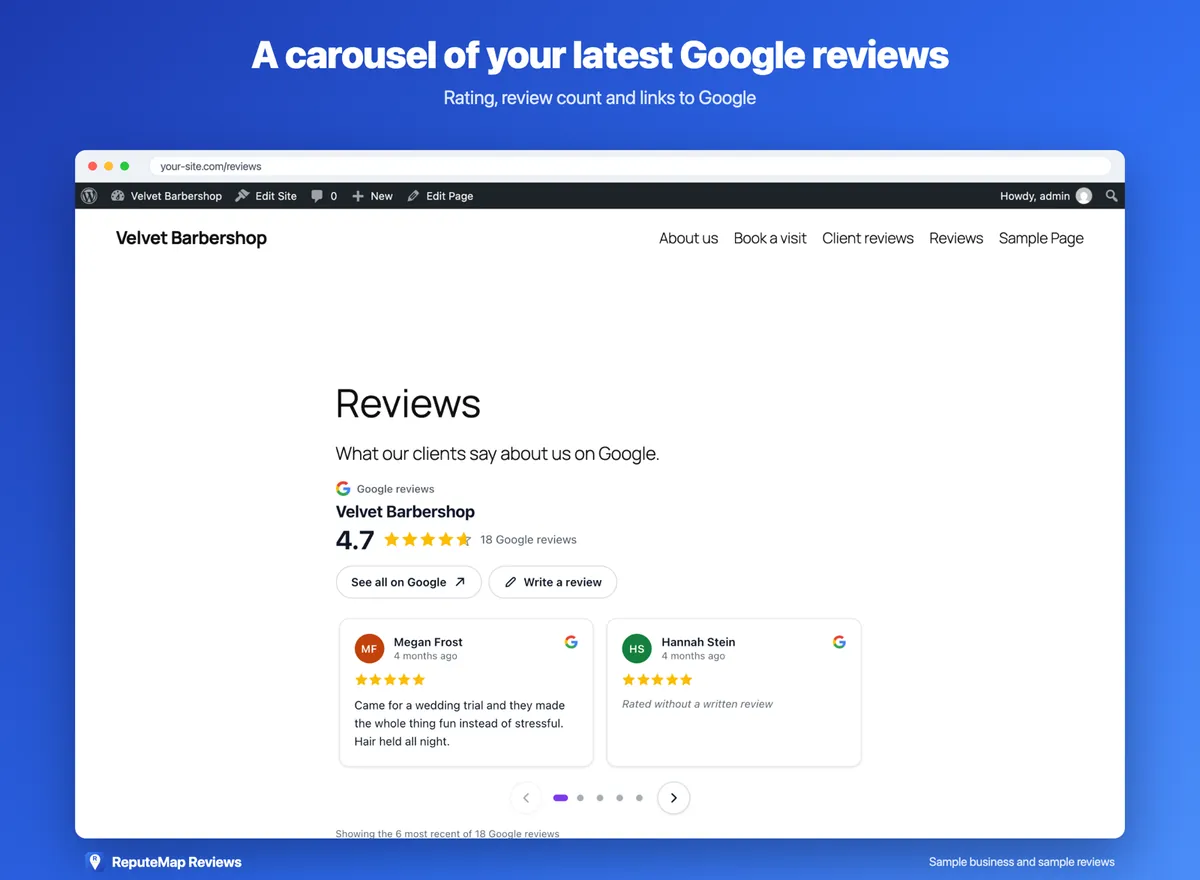
- Free for one location
- No card. Paid plans remove the small ReputeMap link.
- Block or shortcode
- The ReputeMap Reviews block, or
[reputemap_reviews]anywhere. - Light on your site
- Nothing loads on pages without the widget. No server requests.
- No rating filter
- Your real average and your newest reviews, whatever their stars.
What the plugin puts on your site
Your Google reviews, kept current by ReputeMap: new reviews appear in the widget without anyone touching the page. The rating and the review count cover all of your Google reviews, and every layout links to your listing on Google.
-
Six layouts
List, carousel, grid, masonry wall, badge or badge card with your rating and review count, and a floating button in a corner of the page.
-
A block and a shortcode
Add the ReputeMap Reviews block in the editor, or paste [reputemap_reviews] into a page, a post or a widget area.
-
Light, dark or automatic
Automatic follows the background of the page the widget sits on.
-
A Write a review button
Optional, and it opens your Google review form.
-
Defaults, then per-block options
Set the defaults once in Settings → ReputeMap Reviews; any block or shortcode can change them for its own spot.
-
Connect, or paste a token
Connect with a free ReputeMap account from the settings page, or paste the token or embed code of a widget you already have.
Install and connect it in four steps
You need to be an owner or manager of the Google Business Profile. Connecting it takes about 3 minutes.
- Step 1
Install the plugin
In your WordPress admin, go to Plugins → Add New, search for "ReputeMap Reviews", then install and activate it. Or upload the reputemap-reviews folder to /wp-content/plugins/.
- Step 2
Click Connect with ReputeMap (free)
Go to Settings → ReputeMap Reviews and click the button. ReputeMap opens with your site's address and a one-time security code.
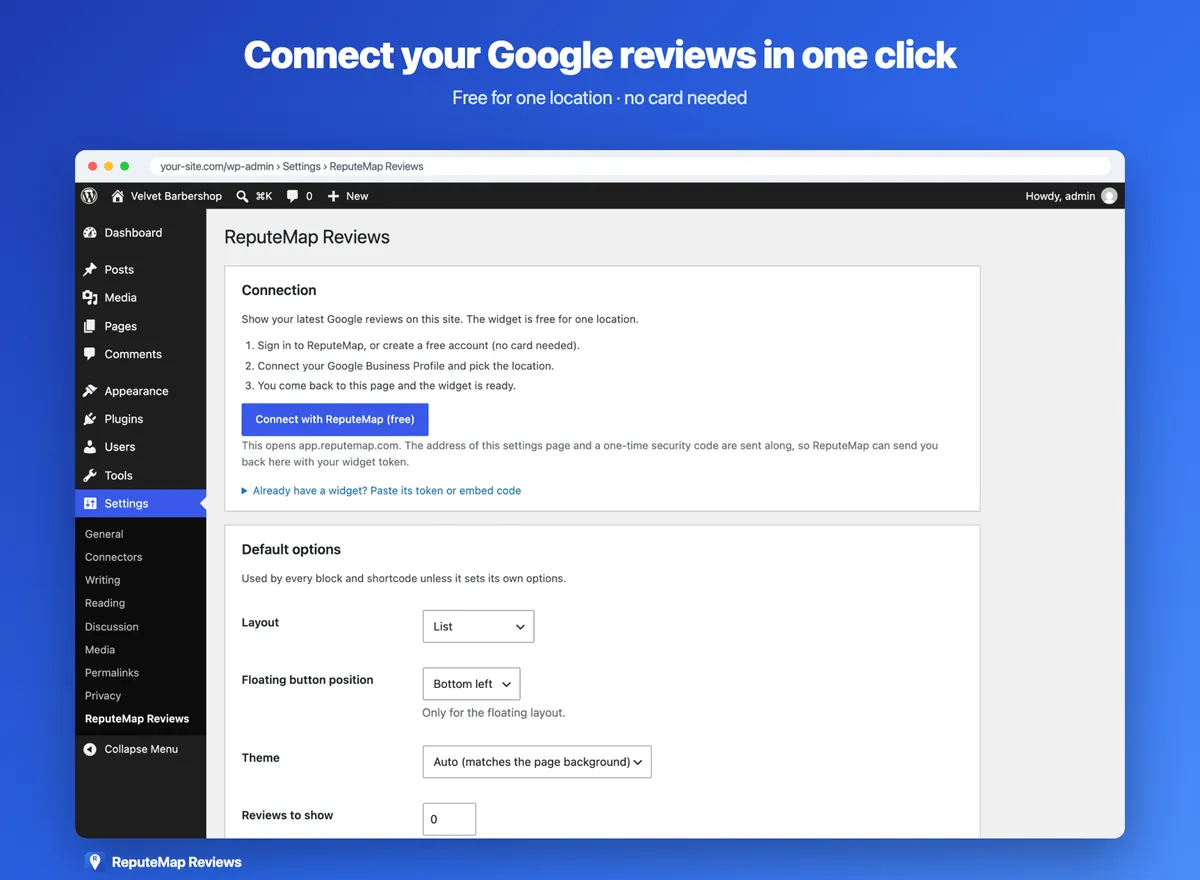
The settings page before connecting. - Step 3
Connect your Google Business Profile
Sign in to ReputeMap or create a free account, connect your Google Business Profile and pick the location. You're sent back to the settings page, which now says Connected and shows a live preview.
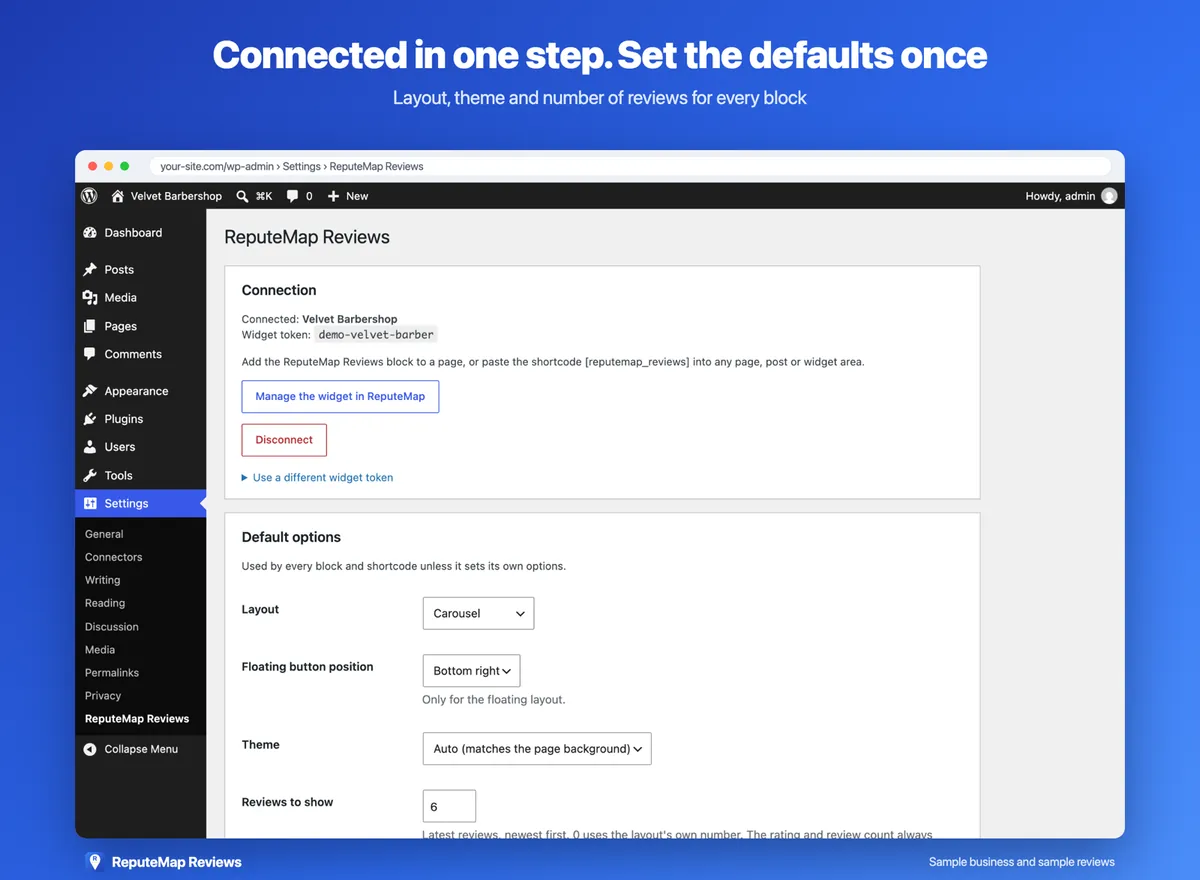
The settings page after connecting. Velvet Barbershop and its reviews are sample data. - Step 4
Add the block or the shortcode
Add the ReputeMap Reviews block to a page, or paste [reputemap_reviews] into a page, a post or a widget area. Set the layout, the theme and the number of reviews per block, or leave the defaults from the settings page.
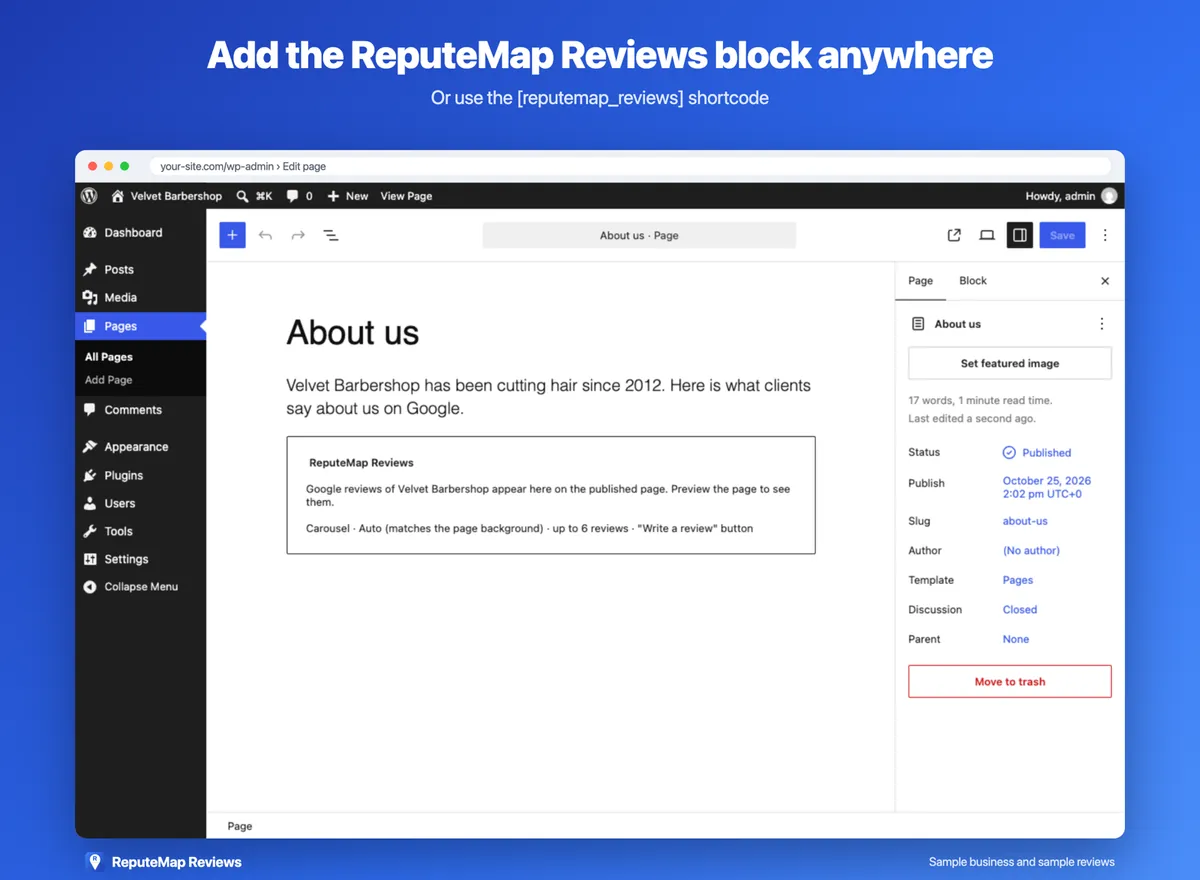
The block in the editor shows a placeholder with its options.
Already have a widget in ReputeMap? On the settings page, open Already have a widget? Paste its token or embed code and paste the embed code instead of connecting.
See the six layouts
The demo below is the real widget the plugin places, running on a sample barbershop's website with sample reviews. Switch layouts and themes to see each one where it would sit on a page. In WordPress you pick them on the settings page, in the block's options or in the shortcode, instead of editing the code line.
Loading the live widget…
One line on your site
<script async src="https://api.reputemap.com/api/public/widget/your-widget-id.js" data-layout="list" data-theme="light"></script> Shortcode options
Options you leave out use the defaults from Settings → ReputeMap Reviews. The block has the same options in its sidebar.
[reputemap_reviews layout="carousel" theme="dark" max="6" write="yes"]| Option | Values | What it does |
|---|---|---|
layout | list, carousel, grid, masonry, badge, badge-card, floating | Picks the layout. |
theme | auto, light, dark | auto follows the background the widget sits on. |
max | 1–50 | How many of your newest reviews to show; the widget has at most your 10 newest to show. |
write | yes, no | The Write a review button that opens your Google review form. |
side | left, right | Floating layout only: the corner it sits in. |
In the block editor the widget shows as a placeholder with its options; the live widget appears on the published page and in the settings page's preview.
Free, or a paid plan
The plugin itself is free. What the widget shows depends on your ReputeMap plan.
| Feature | Free plan | Paid plans, from $19/mo |
|---|---|---|
| Locations with a widget | 1 | Every location on the plan, 1 to 200 |
| Six layouts, light, dark or automatic | Yes | Yes |
| ReputeMap link on the widget | A small "Powered by ReputeMap", nofollow | None |
| Card to sign up | No | Yes, for the 14-day trial |
| Review inbox, AI reply drafts, 1–3★ alerts, review requests | No | Yes |
The "Powered by ReputeMap" link is added by the ReputeMap service to the widget it serves; the plugin adds no links or credits of its own. Solo, $19 a month for one location, shows the widget without it. Compare the plans, or set up the free widget before you install anything.
What it loads, and what it sends
- Nothing from your server. The plugin stores a widget token and your options in your WordPress database and makes no requests of its own.
- Only where the widget is. On a page with the block or the shortcode, the visitor's browser loads one small asynchronous script and your review data from
api.reputemap.com. Other pages load nothing. - No cookies. Those requests carry the widget token and the page's address, plus what every web request carries: the IP address and the browser's user agent.
- Its own Shadow DOM. The widget draws inside it, so your theme's styles and the widget's don't clash.
The readme's External services section lists each request. ReputeMap's privacy policy covers the service.
If the widget doesn't show
- Check the connection. Settings → ReputeMap Reviews should say Connected and show the widget in its preview.
- Exclude it from script optimizers. A plugin that delays, combines or moves JavaScript should leave
api.reputemap.comalone: the widget appears right after its own script tag. - Look in a corner. The floating layout sits in a corner of the window, not in the page content.
- Check the plan. If the ReputeMap account no longer covers the widget, it shows nothing rather than an error.
Limits
- One widget per site. The plugin keeps one widget token. For another location, paste that location's embed code from ReputeMap into a Custom HTML block.
- Up to your 10 newest reviews. The
maxoption goes to 50, but the widget has your 10 newest reviews to show. - Google reviews only. No Facebook, Yelp or Tripadvisor reviews. For those, our comparison of Google review widgets lists multi-platform tools.
- You need access to the profile. The reviews come through your Google connection, so an owner or manager connects it. A widget built on Google's public place data gets at most five reviews per place (Google Reviews API, explained).
- A widget is proof for visitors, not an SEO feature. Search engines don't reliably read reviews drawn by JavaScript, this widget's included.
Not on WordPress? The same widget works on Wix, Squarespace, Shopify, Webflow or any page that takes one line of HTML: free Google reviews widget. A widget shows the reviews you already have; to get new ones every week, see how to get more Google reviews.
Questions about the plugin
Something else? Write to yaro@reputemap.com, or ask in the plugin's support forum on WordPress.org.
Is the ReputeMap Reviews plugin free?
Yes. The plugin is free, and ReputeMap's free plan includes the review widget for one Google location without a card. The free widget shows a small "Powered by ReputeMap" link, which the ReputeMap service adds, not the plugin. Paid plans, from $19 a month, show it without the link.
Do I need a ReputeMap account?
Yes, a free one. Your reviews come from your Google Business Profile, which you connect in ReputeMap; the account is created when you click Connect with ReputeMap (free) on the plugin's settings page. You need to be an owner or manager of the profile.
Can I show reviews for more than one location?
The plugin keeps one widget per site. For another location, paste that location's embed code from ReputeMap into a Custom HTML block. Widgets for more than one location come with paid plans: Starter covers 5 for $29 a month.
Does the widget set cookies or slow my site down?
It sets no cookies. The plugin makes no requests from your server and loads nothing on pages without the widget; where the widget is, it adds one small asynchronous script that loads your reviews from api.reputemap.com and draws them in its own Shadow DOM.
Does it hide negative reviews?
No. The rating and the review count cover all of your Google reviews, the newest reviews are shown whatever their stars, and every layout links to your listing on Google. There is no setting to show only 4- and 5-star reviews.
What happens when I disconnect or delete the plugin?
Disconnect removes the widget token from your site and the widget stops showing. Deleting the plugin removes its options and stored data from your WordPress database. Your ReputeMap account isn't changed either way.
Put your Google reviews on your WordPress site today
Free for one location, no card. Install the plugin, connect your Google Business Profile and add the block.
Get it from WordPress.orgOr compare the paid plans, from $19/mo with a 14-day free trial
WordPress is a trademark of the WordPress Foundation. ReputeMap is not affiliated with or endorsed by Google or the WordPress Foundation.